✨ Free for all GCSE students · 2026 Exams · AI-powered marking
Ace your GCSEs. Everything in one place.
Flashcards, quizzes, AI marking, past papers, grade tracking, a Pomodoro timer, and exam
countdowns — all personalised to your subjects. No subscription. No nonsense.
Every tool a GCSE student needs, built from the ground up and completely free.
🃏
Smart Flashcards
25+ pre-made decks covering all major GCSE topics. Build your own. Rate each
card, track mastery and focus on what you don't know.
25+ decksCustom cardsProgress tracking
🤖
AI Marking NEW
Write answers to real GCSE-style exam questions and get instant AI feedback —
mark, strengths, areas to improve, and model answer pointers.
35+ practice questionsDetailed feedbackGrade
estimate
🧪
Topic Quizzes
14 quiz banks covering Biology, Chemistry, Physics, Maths, History, Geography,
English, Computer Science and more. Instant feedback and explanations.
14 quiz banksInstant feedbackScore
history
⏱️
Pomodoro Timer
Custom focus sessions with break reminders, motivation boosts and auto-session
tracking to planner.
📅
Exam Countdown
2026 timetable pre-loaded. Real countdowns to every paper.
🎯
Grade Tracker
Set current and target grades. See the gap. Stay motivated.
⚡
Active Recall
Import notes, study for 5 minutes, then recall from memory. Spaced reminders to
review the next day.
🗺️
Mind Maps
8 pre-made maps for key GCSE topics. Advanced builder to create and save your
own visual maps.
📋
Past Papers
Direct links filtered to your specific subjects and exam boards.
🗓️
Weekly Planner
Build your study schedule. Pomodoro sessions auto-added.
📖
Revision Help
Science-backed articles on how to revise, exam technique, memory science and
key resources.
25+ subjects
Every major GCSE subject covered
Supports AQA, Edexcel, OCR, WJEC, Eduqas and CCEA. Your dashboard adapts to exactly
what you're studying.
MathematicsBiologyChemistryPhysicsEnglish LanguageEnglish
LiteratureHistoryGeographyFrenchSpanishGermanComputer
ScienceBusiness StudiesReligious StudiesDesign & TechnologyArt & DesignMusicDramaPsychologyCombined Science+ many more
AQAEdexcelOCRWJECEduqasCCEA
Student reviews
What students say
★★★★★
The AI marking is genuinely useful — it actually tells you what you're missing and
what a top-band answer would include. My Biology answers have improved so much.
S
Sophie, Year 11
AQA Biology, Chemistry, Maths
★★★★★
I love that everything is in one place. The exam countdown actually stresses me out
a bit but in a good way — I'm doing way more revision now.
J
Jamie, Year 11
Edexcel History, Geography, English
★★★★★
The Pomodoro timer changed how I revise. I used to sit for hours and barely take
anything in. Now I do proper focused sessions and actually remember things.
M
Maya, Year 10
OCR Physics, Maths, Computer Science
Save your progress
Sign in to sync across devices
Your grades, flashcard progress, quiz scores and notes can
be saved to your account so they're there on any device. No account needed to start — you can sign in later.
🔐 Create an account
Sign up with your email and password. Your data syncs across all your devices
automatically — for free.
or
💾 How data is saved
Here's exactly where your revision data goes:
📱
Without account (default)
All data saved in your browser's localStorage. Works
great on one device. Clears if you clear browser data.
☁️
With account (Supabase)
Data synced to a secure cloud database — access on any
device, never lose progress. Free forever.
🔒
Privacy
No tracking, no ads, no data sold. EasyExams uses only
what's needed to run your dashboard.
Takes 60 seconds
Set up in three steps
01
Tell us your name & year
Just your first name and whether you're in Year 10 or 11. That's it.
→
02
Pick your subjects & boards
Select each subject and its exam board. Everything filters to match exactly what
you're studying.
→
03
Start revising
Your personalised dashboard is ready instantly. Real countdown to your first exam
included.
Free forever · No account needed · Saves in your browser
Ready to start revising smarter?
Join GCSE students across the UK using EasyExams to prepare for 2026.
EasyExams
Your free GCSE revision command centre for 2026
Welcome! Let's get set up.
Save your progress across devices by signing in, or continue as a guest — your data saves in
this browser.
Sign in to sync across devices
or continue as guest
EasyExams
Choose your subjects
Select each subject, then pick its own exam board — different schools use
different boards for different subjects.
EasyExams
You're all set! 🎉
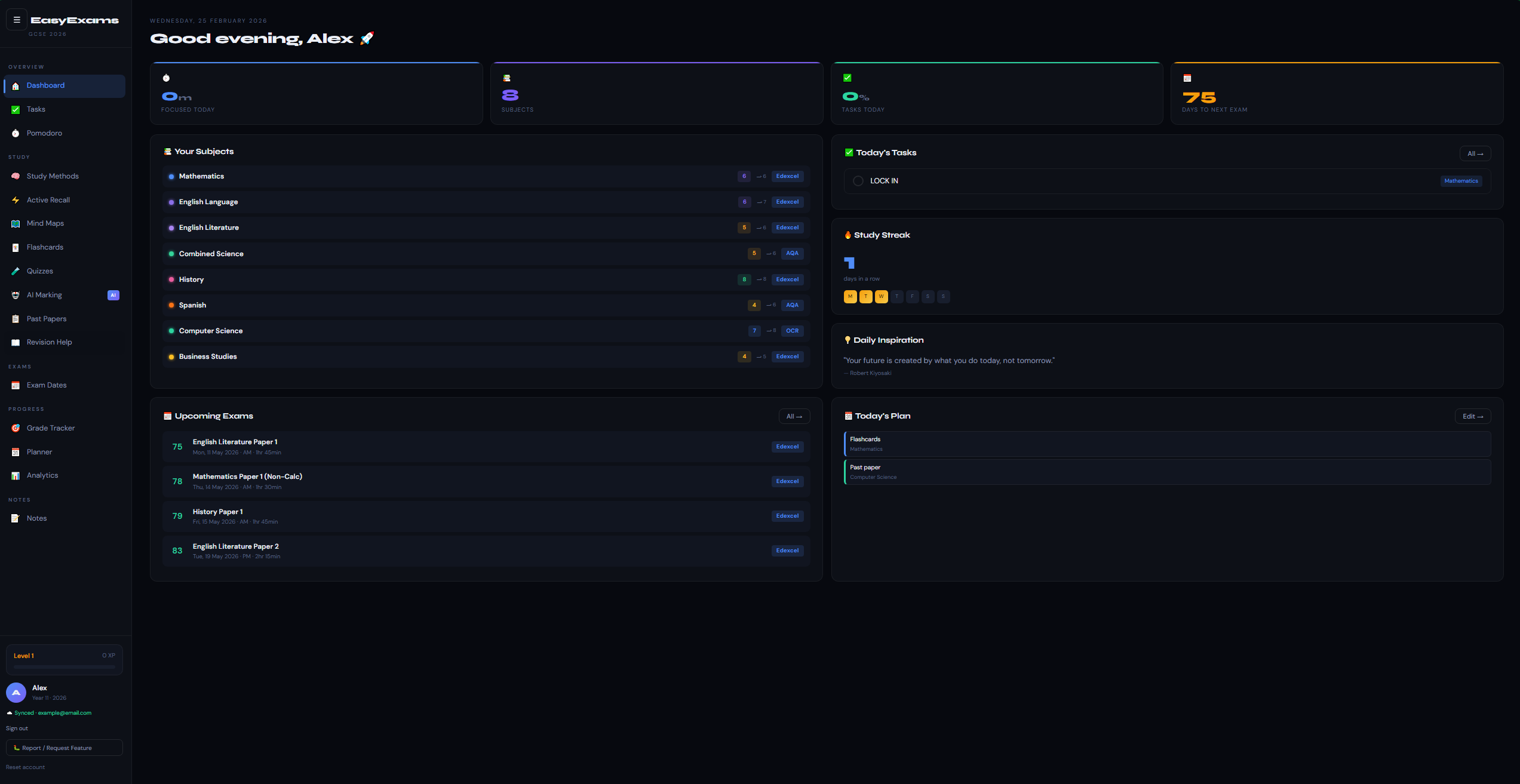
🏠 Dashboard — everything at a glance with real exam countdown
✅ Tasks — daily to-do list that saves between visits
⏱️ Pomodoro — custom focus timer with motivation & auto-playlist
links
⚡ Active Recall — import notes, 5-min study, hide & recall, track
gaps
🗺️ Mind Maps — pre-made maps + advanced builder for all subjects
🃏 Flashcards — 25+ pre-made decks + create your own + CSV import
🧪 Quizzes — 14 quiz banks with instant feedback & explanations
🤖 AI Marking — write exam answers, get AI feedback & marks
📋 Past Papers — direct links for your board, subject and year
📖 Revision Help — science-backed revision articles & technique
guides
📅 Exam Dates — 2026 timetable pre-loaded for your subjects
🗓️ Planner — weekly study schedule builder (auto-filled from Pomodoro)
🎯 Grade Tracker — current & target grades with gap analysis
📊 Analytics — focus time charts, quiz history, study breakdown
📝 Notes — per-subject notes that save automatically
Skip account & continue offline →
🔍Esc to close · Ctrl+K
🎲 Revise a random topic
📚 Your Subjects
✅ Today's Tasks
🔥 Study Streak
days in a row
📊 Weekly Review Summary
Loading...
💡 Daily Inspiration
📅 Upcoming Exams
🗓️ Today's Plan
✅ Tasks
Click a task to complete it · saves automatically
💡 Quick add
⏱️ Pomodoro Timer
Science-backed focus sessions — work smarter, not longer.
25:00Focus
Session 0 of 4 · +0
XP
🎵 Ambient Sound
📊 Today's Focus
0m
Focused
0
Sessions
0🔥
Day streak
0
XP earned
💡 Pomodoro Technique
Work for 25 minutes with full focus, then take a 5-minute break. After 4 sessions, take a longer 15-minute
break. This prevents mental fatigue and keeps you productive.
🎯 Focus Challenge
🧬 Science-Backed Learning
Master Any Subject Faster
These six techniques are backed by decades of cognitive science research. Students
who use them consistently score significantly higher than those who rely on passive re-reading alone.
2×better than
re-reading
50%info lost in 24hrs
without review
+25 XPper Pomodoro
session
⭐
Your Level & XP
Earn XP by completing quizzes, flashcards, Pomodoros, tasks and more
Level 1
0 / 100 XP
🃏+2 XPper flashcard reviewed
🧪+5 XPper quiz correct answer
⏱️+25 XPper Pomodoro completed
✅+10 XPper task completed
🤖+15 XPper AI marking attempt
🎓+20 XPper Feynman note saved
🔥+30 XPdaily streak bonus
☁️syncedto your account
📖 Study Techniques
Click any card to expand it and start practising
📅
Spaced Repetition
🏆 Most effective long-term memory technique
Review material at increasing intervals. Hermann Ebbinghaus showed we lose
50% of new information within 24 hours — spaced repetition fights this by reviewing content
just before you forget it.
Scientifically provenLong-term
memoryUsed by medical students
How to use it:
1
Study a flashcard deck — go through every card once
2
Rate each card: ❌ Hard (review tomorrow) / 🤔 OK (review in 3
days) / ✅ Easy (review in 7 days)
3
Stick to the schedule — only review when due, not before
4
After several cycles, material moves into long-term memory permanently
💡 The science: Each time you retrieve a memory, the neural
pathway strengthens. The difficulty of retrieval is what builds strength — easy reviews provide little
benefit.
⚡
Active Recall
⚡ 2× more effective than re-reading
Testing yourself from memory is dramatically more effective than passively reading
notes. Every time you force your brain to retrieve information, the memory becomes stronger and more
durable.
Proven by 100+ studiesBuilds exam
confidenceWorks for all subjects
How to practise:
1
Close your notes completely — no peeking
2
On a blank page, write/say everything you know about the topic from memory
3
Then open your notes and compare — gaps you couldn't fill are your weak areas
4
Use flashcards, past papers or quizzes instead of re-reading — every time
💡 The science: "The Testing Effect" — dozens of studies show
that retrieval practice beats re-studying, even when total study time is equal.
🎓
Feynman Technique
🎓 Exposes knowledge gaps instantly
Named after Nobel Prize physicist Richard Feynman. "If you can't explain it
simply, you don't understand it yet." This method forces you to identify exactly what you don't
understand and fix it.
Nobel Prize endorsedDeep
understandingFixes exam anxiety
The 4 steps:
1
Choose a concept — e.g. "What is osmosis?" or "Why did WWI start?"
2
Explain it simply — write as if teaching a 10-year-old. No jargon, no textbook
language
3
Spot the gaps — wherever you stumble or had to use technical terms, that's a gap
4
Go back and fix it — review notes for gaps, simplify again until fluent
💡 The science: Generative learning — creating explanations
forces deeper cognitive processing than recognising information from notes.
⏱️
Pomodoro Technique
⏱️ Beat procrastination in 5 minutes
Developed by Francesco Cirillo in the 1980s. Your brain's ability to focus
deteriorates significantly after 25-30 minutes. Structured breaks prevent cognitive fatigue and maintain
performance throughout the day.
Focused work — phone away, one task only, no interruptions
5m
Short break — walk, water, look out the window. Not your phone!
×4
Repeat 4 times (= 2 hours), then take a longer 15-30 min break
🏆
Aim for 4–8 Pomodoros per day = 2–4 hours of genuine deep focus
💡 The science: Parkinson's Law — work expands to fill the time
available. Setting a 25-minute limit creates urgency that makes you more productive.
🔀
Interleaving
🔀 Better retention than blocked studying
Instead of studying one topic for hours ("blocking"), mix different subjects and
topic types in a single session. This feels harder and slower — but research shows it leads to dramatically
better long-term performance.
Improves transferCounterintuitive
but effectiveBuilds discrimination skills
Example session plan:
1
Session 1: Maths — quadratic equations practice (25m)
2
Session 2: Biology — genetics flashcards (25m)
3
Session 3: History — essay planning (25m)
4
Back to Maths — the gap actually improves recall on return
💡 The science: Interleaving forces your brain to continuously
reload information (like active recall) and builds the skill of identifying which method to apply to which
problem.
🤔
Elaborative Interrogation
🤔 Connects new facts to existing knowledge
Ask "Why is this true?" and "How does this work?"
for every fact you study. This forces you to connect new information to things you already know, creating a
web of knowledge that's much harder to forget.
Deep understandingBetter
connectionsWorks with any subject
Examples across subjects:
Bio
Why does osmosis happen? → Because of a concentration gradient across the membrane
Chem
How does a catalyst lower activation energy? → It provides an alternative reaction pathway
Hist
Why did the Weimar Republic collapse? → Economic crisis + political extremism + weak
constitution
💡
For every fact: don't just memorise it — explain why it's true
💡 The science: Elaborative encoding creates multiple retrieval
cues — more ways to "find" a memory. This is why understanding beats memorising for exam performance.
🎓 Feynman Technique Tool
Explain simply → find gaps → earn +20 XP
1 Topic
→
2 Explain
→
3 Gaps
→
4 Save
🃏 Flashcards
25+ pre-made decks ready to study — or create your own
Tap to flip
Tap to flip back
1/1
How well did you know
this? · Cards you miss come back sooner (SM-2)
Progress0%
🧪 Quizzes
Test yourself — instant feedback and explanations for every answer
🤖 AI Assistant
Powered by OpenRouter
Ask anything about your subjects, get exam answers marked, or get personalised revision
advice
🤖
Hi! I'm your AI
tutor.
Ask me anything about your
GCSE subjects. I can explain concepts, help with tricky questions, suggest revision strategies, or quiz
you on topics.
Press Enter to send ·
Shift+Enter for new line · Powered by OpenRouter
✅
AI Exam Marking
Write a full answer to a GCSE-style exam question. AI marks it, gives detailed
feedback, and suggests improvements — just like a real examiner.
Choose a question — filtered to your subjects
Practice Answer
0 words
🎯 Exam Prep
Everything you need to know before walking into the exam hall
Exam tips, topic predictions, paper structure, allowed equipment & day-of strategy — filtered to your subjects.
🌙 Night Before Exam
Essential final checks before you head into the exam hall
tomorrow.
🎒 Pack Your Bag
🧠 Final Checks & Mindset
⚡ Quick Review (Optional)
Do not stay up late studying. If you must
review, just look over high-level concepts.
🤖
AI Marking has moved!
It's now in the AI tab with the new AI Tutor chat.
⚡ Active Recall
The most powerful revision technique — study, hide, then recall from memory. Beats
re-reading every time.
1 · Setup
2 · Study
3 · Recall
4 · Review
💡
Step 1: Set up your session. Choose your topic, paste your notes, and set how long you want
to study them before they disappear.
📚 Session Setup
min
📋 Your Notes (will be hidden!)
Paste your class notes, textbook
summary, or any content you want to memorise. They'll disappear when the study timer ends.
📎 Import notes from file — drag & drop or click to browse
Supports PDF, Word (.docx), and plain text (.txt)
Or load from saved notes:
Study carefully — when the timer runs
out, your notes will disappear. Then you'll write everything you can remember.
05:00
Time remaining to study notes
📋 Your Notes
🧠
Notes Hidden! Write from memory.
Don't peek! Write everything you can remember about:
0 words
✍️ What you recalled
📋 Original notes
🎯 Self-assessment: What did you miss?
Identify specific gaps — this is the most
important part. What key points were in the original that you didn't write?
📅 Your Recall
Sessions
🗺️ Mind Maps
Visualise connections between topics · pre-made maps for key GCSE topics · build your own
🔨 Mind Map Builder
📖 Revision Help
Articles, guides and key knowledge to help you revise smarter — based on the science of
learning
📐 Specifications
Tick off topics as you revise them · Click the emoji (❓📖👍✅) to rate your understanding ·
progress syncs to your account ☁️
🎲 Revise a random topic
📐
Loading specifications...
📋 Past Papers
Filtered to your subjects and boards. Links open trusted revision sites with official
papers.
📅 Exam Dates 2026
Official 2026 timetable · Season: 4 May – 26 June · Results: 20 Aug · Click any exam to view details & add notes ↗
🎯 Grade Tracker
Set your current and target grades — tracks your progress over time and syncs to your
account ☁️
🗓️ Weekly Planner
Click a day's + button to add a study session · Click a
suggestion below to quick-add to today
⚡ Suggested for today
📊 Analytics
Your study habits, quiz performance and progress — tracked automatically
🗓️ Study Calendar — Last Year
Hover cells to see details
📚 Study Log
What you studied and when — from Pomodoro
sessions
⏱️ Focus Time — Last 7 Days
📈 Your Stats
🧪 Recent Quiz Scores
📚 Subject Study Breakdown
🥧 Where Is Your Time Going?
⭐ XP History
🃏 Flashcard Performance
📈 Grade Progress Over Time
🏆 Study Leaderboard
Last 7 days
Compare your study time with other
EasyExams users — synced automatically 🌍
📝 Notes
Per-subject notes · import PDFs/docs · 🎙️ record & transcribe lectures · use in study
methods
🎙️ Lecture Recorder
Record your lecture or study session — AI
will transcribe it and format it as notes automatically.
0:00Ready to record
Transcription
Or upload an existing audio file:
My
Notes
Use selected note in:
📎 Import file (PDF / Word / Audio / TXT)
0 words·Ctrl+Enter to save
🔀 Interleaving Planner
Mix up your subjects in each session — research shows this beats blocked study for long-term
retention
New Task
New Flashcard Deck
Add Flashcard
Add Exam Date
Exam Details
Add Study Session
💬 Support & Feedback
⚙️ Settings & Account
Topic Detail
🎉
LEVEL UP!
Level 2
Keep going — you're unstoppable!
📥 Import Flashcards
Import from a CSV file or paste directly. Format: question,answer (one per line).
Works with Quizlet exports (Tab separated), Gimkit, or any CSV.
⚙️ Pomodoro Settings
⚙️ Site Settings
Customise your EasyExams experience
🎨 Appearance
Subject Colours
Pick a colour per subject (tasks, spec, planner)
Accent Colour
Main colour used throughout the app
Compact Sidebar
Show icons only, hover to see labels
Show XP Animations
Celebrate XP gains with animations
🔔 Notifications
Desktop Notifications
Notify when Pomodoro completes · Not enabled
Daily Reminder
Get a browser notification to study each day at 4pm
📊 Data & Privacy
Export All Data
Download all your revision data as JSON
Delete Account
Permanently delete all your data
📋 Changelog
What's new in EasyExams
v2.5April 2026Latest
🎯 Exam Prep page — tips, predictions, paper structure & day-of checklist per subject
🤖 AI usage tracker — daily request counter now visible on AI page
🔢 Quizzes fix — All Quizzes tab now loads reliably without crashing
📊 Dashboard stat boxes — now span the full width of the page
📋 Changelog added to Settings (you're reading it!)
v2.4April 2026
🔊 Audio transcription in Notes — record voice memos and auto-transcribe
🤖 AI daily limit — 30 requests/day tracked per account via Supabase
🔀 OpenRouter integration — faster, more reliable AI responses
⚙️ Sidebar collapse improvements and mobile fixes
v2.3April 2026
⏱️ Pomodoro timer fully redesigned with ambient sounds + XP integration
🗓️ Planner redesigned with weekly view and task sync
📐 Specifications page added — full spec per subject with topic tracking
🧪 Quiz banks expanded — 9 new banks across all subjects
v2.2March 2026
🃏 Flashcard system — custom decks, CSV import, spaced repetition
📊 Analytics page — study heatmap, quiz scores, session breakdown
🎯 Grade Tracker — current/target grades with gap analysis
🌙 Night Before checklist added
v2.0March 2026
🚀 EasyExams v2 launched — complete redesign
🌑 Dark mode as default with glassmorphism UI
☁️ Supabase cloud sync — data backed up to your account
📅 2026 exam timetable pre-loaded for all major subjects